
Reporting Server Module
Reporting Server Module
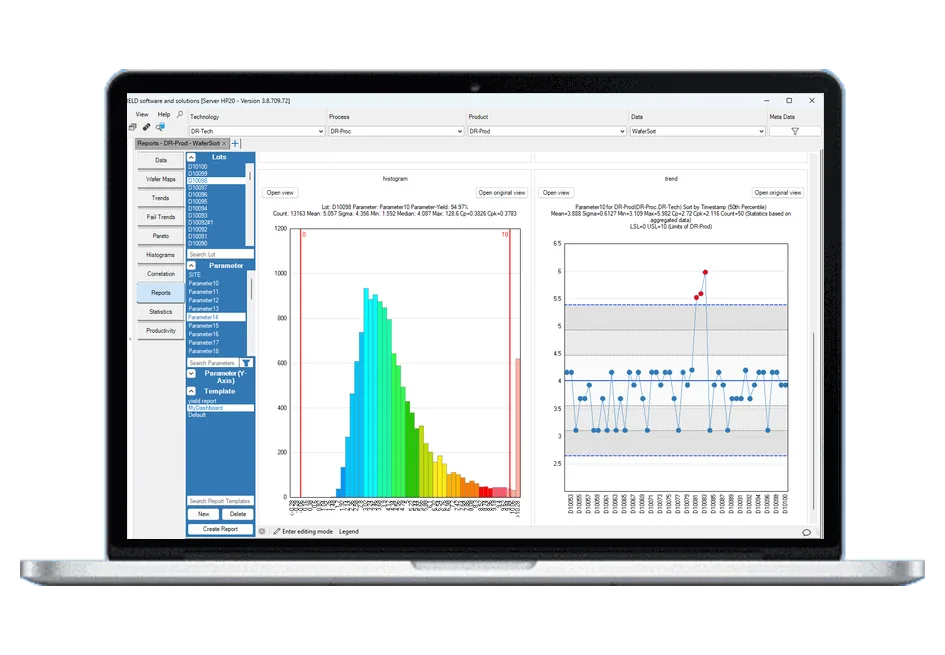
The Reporting Server Module creates configurable reports automatically — per imported lot, on a schedule, when an SPC rule is violated, or manually — from the templates built in the Reports view, and delivers them as HTML or PDF by email.
Capabilities
Reporting Server Module: what it does
- Triggers: import, time, SPC and manual
- HTML reports with an optional PDF version, page size and orientation selectable
- Email delivery with a link to the report, embedded or attached
- Lot selection such as latest N lots, last hours, weeks or months, or today
- Report settings configured from the YieldWatchDog client
Related pages
Support
Direct support from our experts
A direct technical contact who understands the software and the industry — no ticketing queue, the same level of support regardless of company size.
See it working on your own data
Low-cost trial installations are available. Our team will write the loaders and parsers for your data during the installation.
Schedule DemoFAQ
Frequently asked questions
How are reports triggered?
A report can be triggered manually, when a lot is imported, on a schedule, or by an SPC rule violation. For schedules you set the time of day, the days of the month and the repetition. For lot-based reports you choose which lots are included: the latest N lots, the last N hours, weeks or months, or today. All of this is configured in the Reporting Server Settings window of the YieldWatchDog client, where each report can also be switched on or off and triggered on demand for a test.
What do the reports look like and how are they delivered?
Reports are built from the report templates you create in the Reports view, so they contain the same charts and panels your engineers use every day. They are rendered as HTML and can optionally be converted to PDF, with selectable page size and orientation. By email, the recipients receive a direct link to the HTML report, or the report embedded in the message or attached as HTML or PDF. Reports can be created for engineering, management or even for your customers.
How does the Reporting Server work with other modules?
Statistical Process Control can trigger reports through the Reporting Server: when an SPC rule is violated, the reports set up for that case are created and sent automatically. The server runs only when the module is licensed and works on the YieldWatchDog server, so reports are created inside your own infrastructure.