YWD AIssistant
YWD AIssistant
Ask your yield data questions in plain language, right in the YieldWatchDog client. The AIssistant reads the wafer maps, trends and charts you have open, explains the patterns it finds and takes you to the next view with one click. It runs on the model you choose, including your own inference server, with your own license and your own document sources.
Capabilities
YWD AIssistant: what it does
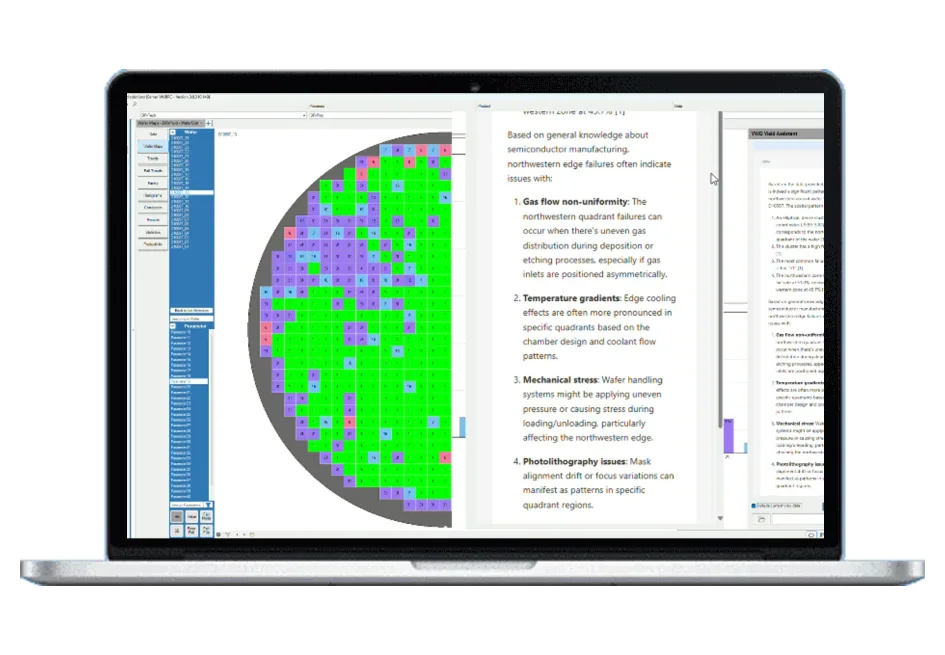
- Reads your current view — wafer maps, trends, fail trends, pareto, histogram, correlation, statistics and data tables — only when you tick “Include current view data”
- Pre-analyses wafer maps first: zones, clusters, edge-to-centre gradients and symmetry, so answers describe real spatial signatures
- Compares the wafers on screen and groups similar patterns, wafer to wafer and lot to lot
- Suggests the next step: answers end with buttons that open the matching view with lots, wafers and parameters already set
- Answers “how do I …” questions from YieldWatchDog’s documentation and says so when a topic is not covered
- Uses your own knowledge base: administrators add procedures, specifications or links and mark them as reviewed
- Runs with the model you choose: Claude, OpenAI via Azure, a local model on the YieldWatchDog server, or your own inference server — per installation and per use case
- Uses your own license and contract with the model provider
- Connects your own RAG: your existing retrieval system and document sources, alongside the built-in knowledge base
- Answers in your language, as far as the chosen model supports it
- Keeps the context for follow-up questions; start a new conversation at any time
- Sends a question it cannot answer to DR YIELD support in two clicks
Related pages
Support
Direct support from our experts
A direct technical contact who understands the software and the industry — no ticketing queue, the same level of support regardless of company size.
See it working on your own data
Low-cost trial installations are available. Our team will write the loaders and parsers for your data during the installation.
Schedule DemoFAQ
Frequently asked questions
What is the YWD AIssistant?
The YWD AIssistant is an AI chat assistant built into the YieldWatchDog client. It sits next to every main view and can be opened in its own window. You ask a question in plain language, and the assistant answers on the basis of the view you are looking at: wafer maps, trends, fail trends, pareto charts, histograms, correlations, statistics or the data table. Before wafer maps are passed on, YieldWatchDog analyses them itself, finding zones, clusters, edge-to-centre gradients and symmetry, and compares the patterns across the wafers on screen, so the assistant works with spatial signatures rather than raw numbers. Each answer ends with suggestions for the next step: a click opens the matching view, for example a trend or a single wafer, with lots and parameters already set. The assistant keeps the context of the conversation for follow-up questions, and you can start a new conversation at any time. Conversations are not stored. You can ask in your own language: the assistant answers in the languages the chosen model supports.
What data does the AIssistant see?
Only what you choose to send. The data of your current view goes to the assistant only when you tick “Include current view data” for that message; the box is off by default. Without it, the assistant answers from YieldWatchDog’s documentation and your own knowledge base. Because it works with what is on your screen, the assistant sees only data the logged-in user is already allowed to see, so the user rights set in YieldWatchDog apply unchanged. The assistant does not change data or settings: it suggests views, and you decide with one click whether to open them. If it cannot answer a question, you can send the question and a comment to DR YIELD support after a confirmation step.
Can the AIssistant run on our own infrastructure?
Yes. The AIssistant runs as a separate service next to the YieldWatchDog server, and the language model behind it is a configuration choice: Claude, OpenAI through Azure, a local model, or your own inference server. Your own inference server can be any model server in your network with an OpenAI-compatible interface, for example vLLM, Ollama or LM Studio. For a local model, inference with Llama 3.1 8B runs directly on the YieldWatchDog server, on CPU or GPU. With your own server or the local model, no data leaves your own infrastructure. Cloud models run under your own license and contract with the provider, so your existing terms apply. The model can also be chosen per use case, so software help, your internal documentation and data analysis can each use a different model. The search over documents runs locally as well: embeddings and reranking are computed offline on the server. Which provider is used can therefore follow your company’s policy for AI services.
How does the AIssistant use our own documents?
The AIssistant uses retrieval-augmented generation (RAG): before it answers, it searches the relevant documents and bases its answer on what it finds. YieldWatchDog’s own documentation answers “how do I …” questions about the software; in this mode the assistant answers only from the documentation and says so when a topic is not covered. Your company knowledge base adds your own procedures, specifications or links: administrators upload PDF, text or Markdown files or add URLs under “Manage Knowledge Base”, and can mark each document as reviewed, with who reviewed it and when. If you already run your own RAG, you can connect your retrieval system and document sources instead of, or alongside, the built-in knowledge base. The built-in search combines keyword and semantic search, so it finds both exact terms such as bin names and related wording. Data analysis draws on these sources too, so answers can reflect how your fab names and handles things.
Does the AIssistant need a separate license?
Yes. The YWD AIssistant has its own license, separate from the standard Professional, Industrial and Ultimate editions. Because modules are licensed flexibly and are independent of the edition, you can add it to any edition. The language model itself runs under your own license and contract with the model provider, or on your own infrastructure. Please contact us or schedule a demo to see it working on your own data and to discuss which model provider fits your requirements.