Defect Module
Vendor-independent defect correlation
Ingests defect and inspection data from any vendor’s equipment, including KLARF files, and correlates it with yield, tool, and process data — interactive wafer maps, defect clusters, kill ratios, and spot adders/repeaters, linked back to the tools and process steps behind them.
Capabilities
Defect Module: what it does
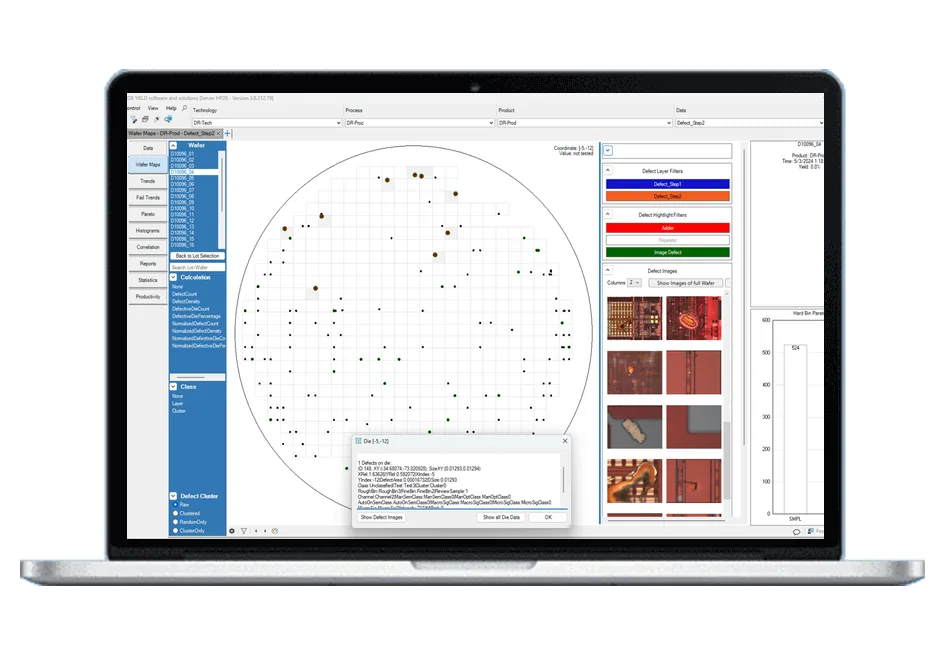
- Interactive wafer maps with defect overlay and navigation through inspection layers
- Stacking of defect maps from multiple wafers in one view
- Overlays of multiple inspection layers, and of defect maps against probe or parametric maps
- Defect density, kill ratio and defect trends tracked alongside yield, test and tool data
- Defect clusters, spot adders and repeaters, with related defect images viewed alongside the map
- Link defects directly to tools, process steps or lots to pinpoint root causes
- Built-in exports, overlays and trend tools for fast, targeted action
- One environment for yield and defect analysis — no switching between tools
- Vendor-independent — any inspection equipment
Related pages
Support
Direct support from our experts
A direct technical contact who understands the software and the industry — no ticketing queue, the same level of support regardless of company size.
See it working on your own data
Low-cost trial installations are available. Our team will write the loaders and parsers for your data during the installation.
Schedule DemoFAQ
Frequently asked questions
What does the Defect Module do?
The Defect Module brings defect inspection data and images into YieldWatchDog, alongside yield, test and process data, so engineers no longer switch between tools to connect inspection results with yield loss. You can navigate inspection layers on interactive wafer maps, overlay data, spot defect clusters, adders and repeaters, view related defect images, and track key metrics such as defect density, kill ratio and defect trends over time. Because the data lives in the same environment as the test and tool data, defects can be linked directly to the tools, process steps or lots behind them. The module was developed in close cooperation with several customers and is already in use at multiple customer sites.
How does the Defect Module help to find root causes?
Root-cause analysis starts with correlation. In YieldWatchDog a defect cluster or a repeater is not an isolated picture: you can link defects to the tool, process step or lot behind them, overlay them with yield and test results on the wafer map, and follow how the issue evolves over time with trend tools. Built-in exports and overlays let engineers pinpoint the cause and take targeted action, improving yield and preventing recurrence. Kill ratios show how strongly defects translate into yield loss, so the effort goes where it matters. Everything happens in a few clicks inside the platform engineers already use for yield analysis, without exporting data to a separate defect tool.
Is the Defect Module tied to one inspection vendor?
No. The Defect Module works with defect and inspection data from any vendor’s equipment. YieldWatchDog databases use the same data model for every data source, and new sources are integrated with our standardized data integration process: either our integration experts write the converters that parse your inspection data into the YieldWatchDog format as part of our service — KLARF and other industry-standard defect inspection formats are already supported — or your in-house experts follow our integration guidelines and do it themselves. A low-cost trial installation lets you see your own inspection data in YieldWatchDog before you decide, with our experts writing the loaders and parsers during the trial.