
Tool Combination Module
Tool Combination Module
The Tool Combination Module is an extension of the Equipment Monitoring Module. Its report identifies both optimal and problematic tool combinations: which combinations of tools across process stages the selected lots passed through, ranked by yield.
Capabilities
Tool Combination Module: what it does
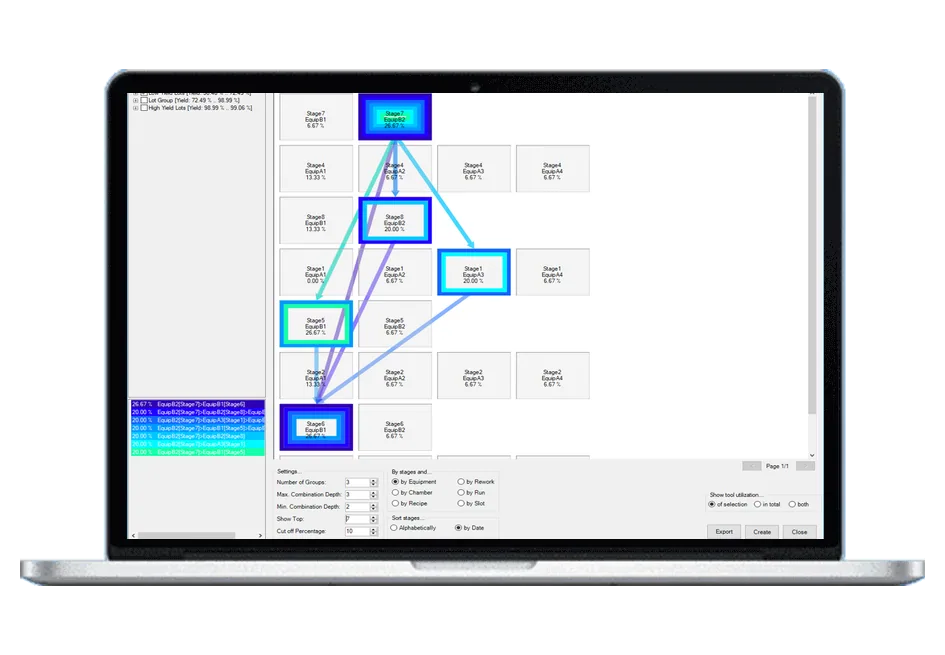
- Combinations by equipment, chamber, slot, run, rework or recipe
- Configurable minimum and maximum combination depth, number of groups and top-N results
- Graphical per-stage view of tool utilization and links between stages
- Graphical visualization and export of results
Related pages
Support
Direct support from our experts
A direct technical contact who understands the software and the industry — no ticketing queue, the same level of support regardless of company size.
See it working on your own data
Low-cost trial installations are available. Our team will write the loaders and parsers for your data during the installation.
Schedule DemoFAQ
Frequently asked questions
What does the Tool Combination Module show?
The Tool Combination Report identifies both optimal and problematic tool combinations. For the lots you have selected, it shows which combinations of tools across the process stages they passed through, sorted by yield, with the share of lots for each combination written as a chain of stages. You can see which sequences of tools correlate with good or bad lots and where tool utilization differs, and export the result as a CSV file for further analysis.
How do I configure the analysis?
You choose whether combinations are formed by equipment, chamber, slot, run, rework or recipe, how many groups of lots are compared, the minimum and maximum combination depth, how many top results are shown and the cut-off percentage. Stages can be sorted alphabetically or by date, and tool utilization can be shown in total, for the selection or both. The report works on the lots and groups currently selected in the client, by default on the yield parameter.
How does it relate to the Equipment Monitoring Module?
The Tool Combination Module is an extension of the Equipment Monitoring Module and works on the same equipment data: lot, stage, equipment and time information per lot. The Tool Commonality Report of the Equipment Monitoring Module shows which individual tools or tool groups lots passed through; the Tool Combination Report adds the analysis of combinations of tools across consecutive process stages.